'%3e%3cpath%20fill-rule='evenodd'%20clip-rule='evenodd'%20d='M33%2033H1V1H33V33Z'%20fill='white'/%3e%3cpath%20fill-rule='evenodd'%20clip-rule='evenodd'%20d='M33%2033H1V17H33V33Z'%20fill='%23DC143C'/%3e%3c/g%3e%3crect%20x='0.5'%20y='0.5'%20width='33'%20height='33'%20rx='16.5'%20stroke='black'%20stroke-opacity='0.1'/%3e%3cdefs%3e%3cclipPath%20id='clip0_37449_250459'%3e%3crect%20x='1'%20y='1'%20width='32'%20height='32'%20rx='16'%20fill='white'/%3e%3c/clipPath%3e%3c/defs%3e%3c/svg%3e)

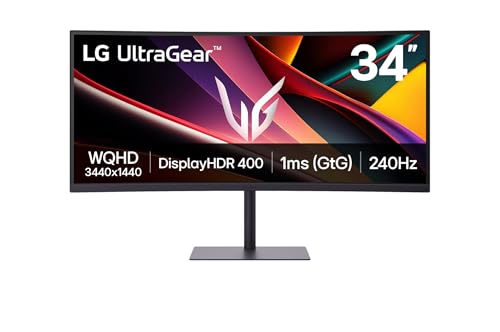

Taking a closer look at the LG UltraGear Gaming Monitor, a 34-inch ultrawide built around high refresh and vivid colour. 240Hz and a 1ms GtG response keep fast movement crisp while 95% DCI-P3 and VESA DisplayHDR 400 lift overall image punch. Gamers and content watchers will want to know whether those strengths match real-world uses.
⚡ At a Glance
- • Image Quality: UltraWide 3440x1440 resolution, 95% DCI-P3 colour coverage and VESA DisplayHDR 400
- • Targeted at: Competitive and immersive gamers who prioritise high frame rates and a wide field of view
- • Not suited to: Professional HDR colour graders; HDR400 peak and VA off-axis shifts will misrepresent highlight roll-off during critical grading
An ultrawide 34-inch WQHD panel tuned for fast gameplay with a 240Hz refresh and 1ms GtG. Connectivity includes HDMI 2.1, DisplayPort and USB-C, while HDR400 and 95% DCI-P3 lift colour for games and media.
📋 Technical Details at a Glance
- Display Size: 34 inch (roughly the width of a carry-on suitcase)
- Resolution: 3440 x 1440 (WQHD)
- Aspect Ratio: 21:9
- Panel Type: VA
- Refresh Rate: 240 Hz
240Hz Refresh vs Motion Blur
A 240Hz refresh rate combined with a 1ms GtG response cuts motion blur and reduces visible ghosting during rapid pans and flicks. Direct impact on gameplay translates to sharper target tracking in fast FPS and more readable motion in racing titles.
Faster frame updates keep gameplay visually coherent at high framerates, making twitch reactions and tracking feel more precise. Bear in mind that the VA panel still shows more black-level smearing than IPS at extreme angles, so competitive players who sit off-centre may notice a handful of artefacts.
95% DCI-P3 vs Washed-Out Colour
Wide colour coverage and VESA DisplayHDR 400 lift saturation and contrast for richer game worlds and HDR highlights. A user scenario: cinematic titles render foliage and skies with deeper saturation while HDR scenes show clearer highlight separation compared with non-HDR displays.
Colour-rich presentation enhances immersion for single-player and cinematic experiences, especially when viewed head-on. Trade-off: HDR400 delivers improved punch over SDR but does not reach the peak brightness or local-dimming fidelity required for professional HDR mastering.
Does HDR400 Live Up to the Hype?
HDMI 2.1, DisplayPort and USB-C ports provide the bandwidth needed for high-refresh PC and console setups while built-in speakers cover basic audio needs without external speakers. FreeSync Premium synchronises frame delivery with compatible GPUs, eliminating obvious tearing and major stutter.
If you switch between a next-gen console and a gaming PC, HDMI 2.1 and DisplayPort prevent common bandwidth bottlenecks and simplify multi-platform setups. If a single-cable laptop connection appeals, a USB-C port reduces clutter and carries display and sound, though dedicated audio remains preferable for serious streaming or commentary.
✨ The Verdict on LG UltraGear Gaming Monitor Performance
- 240Hz refresh – Keeps fast-paced games sharply defined and responsive
- 1ms GtG response – Minimises reverse ghosting for clearer moving objects
- HDMI 2.1 + DisplayPort – Removes bandwidth limits for high-refresh consoles and PCs
- USB-C and speakers – Simplifies single-cable laptop setups and provides basic sound without extra kit
🏆 Our Verdict
A strong choice for gamers who want an ultrawide view and ultra-high refresh for competitive and immersive play. The curved VA panel delivers punchy colour and deep contrast when viewed head-on, with the screen filling a desk much like a compact TV presence; that tactile sense of wrap-around immersion proves useful during long sessions. Regular players who value high frame rates and wide-field immersion will find long-term value in the feature set, while professionals needing perfect HDR or absolute viewing-angle fidelity should look elsewhere.