





'%3e%3cpath%20fill-rule='evenodd'%20clip-rule='evenodd'%20d='M33%2033H1V1H33V33Z'%20fill='white'/%3e%3cpath%20fill-rule='evenodd'%20clip-rule='evenodd'%20d='M33%2033H1V17H33V33Z'%20fill='%23DC143C'/%3e%3c/g%3e%3crect%20x='0.5'%20y='0.5'%20width='33'%20height='33'%20rx='16.5'%20stroke='black'%20stroke-opacity='0.1'/%3e%3cdefs%3e%3cclipPath%20id='clip0_37449_250459'%3e%3crect%20x='1'%20y='1'%20width='32'%20height='32'%20rx='16'%20fill='white'/%3e%3c/clipPath%3e%3c/defs%3e%3c/svg%3e)

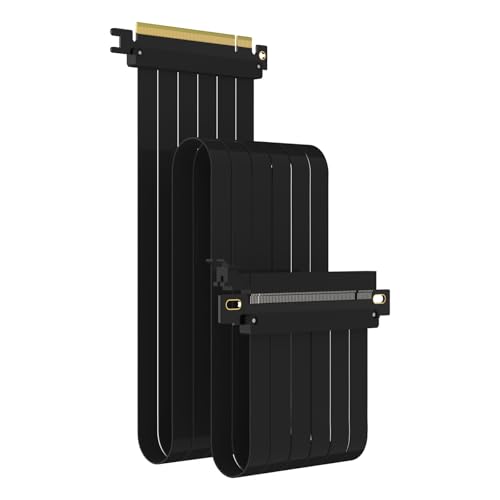
PCIe riser cable designed to preserve a full x16 connection and deliver reliable PCIe 3.0 bandwidth for externally mounted GPUs. Builders who want tidy vertical GPU layouts and dependable transfer speeds will appreciate the flexible reach and simple setup, with the name shown below in bold. Is it the right choice for systems that must avoid PCIe 4.0 instability? GLOTRENDS PCIe 3.0 x16 Riser Cable
⚡ At a Glance
- • Transfer Speed: 16GB/s peak bandwidth over a PCIe 3.0 x16 connection
- • Best for: Builders using low-end PCIe 3.0 GPUs such as GeForce RTX 20/GTX 16/GTX 10 and compatible AMD Radeon cards
- • Not ideal for: Owners of PCIe 4.0 GPUs, which may see degraded performance or system instability
Supports PCIe 3.0 x16 with a declared 16GB/s peak speed, no driver installation required. Packaged in an anti-static bag and backed by lifetime tech support.
Stable high-speed transfers - With PCIe 3.0 x16 signalling
Supports PCIe 3.0 x16 lanes and is specified for a 16GB/s peak transfer rate, with no driver installation required and hot swapping not supported. Handle gold fingers carefully as contamination can affect signal performance.
Provides sufficient bandwidth for transcoding and heavy workloads, as user reports confirm reliable transfer speeds. Predictable behaviour suits sustained GPU tasks where consistent throughput matters.
Neater layouts and vertical showcases - With a 1000mm flexible cable length
A 1000mm cable gives extra reach for vertical GPU mounting and flexible routing inside larger cases, shipped inside an anti-static bag to protect contacts. Avoid direct contact with the gold finger prior to installation to preserve signal integrity.
Makes it straightforward to display a GPU for custom loop lighting or to relocate a card away from the motherboard. Reviewers have used the cable to showcase builds while maintaining connection reliability.
Compatibility guidance for newer cards - With BIOS PCIe 3.0 fallback instructions
The manufacturer warns that PCIe 4.0 GPUs may experience degraded performance or blue screens, and recommends manually setting the PCIe slot in BIOS to PCIe 3.0 where necessary. Hot swapping is not supported.
Helps avoid instability when pairing with newer GPUs by forcing PCIe 3.0 operation in BIOS. Best suited to confirmed PCIe 3.0 cards to ensure trouble-free operation.
✨ The 4 Key Reasons for GLOTRENDS PCIe 3.0 x16 Riser Cable
- Plug-and-play installation, No driver required, quick connection for mainstream PCIe 3.0 GPUs
- Anti-static packaging, Protects contacts during storage, avoids signal problems before installation
- 1000mm flexible cable, Long reach useful for vertical GPU mounts and routing
- Lifetime tech support, Direct help for compatibility and setup queries when needed
📋 Technical Details at a Glance
- Category: PCIe Riser Cable
- Interface: PCIe 3.0 x16
- Peak Bandwidth: 16GB/s
- Length: 1000mm
- Compatibility: GeForce RTX 20/GTX 16/GTX 10 series; AMD Radeon RX5000/VII/RX Vega/R9 Fury series
❓ Frequently Asked Questions
Q: Will this work with PCIe 4.0 graphics cards?
A: For PCIe 4.0 GPUs, performance may be degraded or blue screens may occur; the manufacturer recommends manually setting the PCIe slot in the BIOS to PCIe 3.0.
Q: Do I need to install drivers to use the cable?
A: No driver installation is required, but hot swapping is not supported.
Q: How should I handle the contacts during installation?
A: The cable is packaged in an anti-static bag and users should avoid touching the gold finger before use, as handprints or stains can affect signal performance.
🏆 Our Verdict
Suitable for builders who want to extend or vertically mount low-end PCIe 3.0 GPUs for display or sustained workloads. The combination of full x16 signalling, 1000mm reach and anti-static packaging, plus lifetime tech support, is the main selling point. Offers solid long-term value for system builders who prioritise reliable PCIe 3.0 performance, but avoid pairing with PCIe 4.0 cards unless BIOS fallback is configured.
