





'%3e%3cpath%20fill-rule='evenodd'%20clip-rule='evenodd'%20d='M33%2033H1V1H33V33Z'%20fill='white'/%3e%3cpath%20fill-rule='evenodd'%20clip-rule='evenodd'%20d='M33%2033H1V17H33V33Z'%20fill='%23DC143C'/%3e%3c/g%3e%3crect%20x='0.5'%20y='0.5'%20width='33'%20height='33'%20rx='16.5'%20stroke='black'%20stroke-opacity='0.1'/%3e%3cdefs%3e%3cclipPath%20id='clip0_37449_250459'%3e%3crect%20x='1'%20y='1'%20width='32'%20height='32'%20rx='16'%20fill='white'/%3e%3c/clipPath%3e%3c/defs%3e%3c/svg%3e)

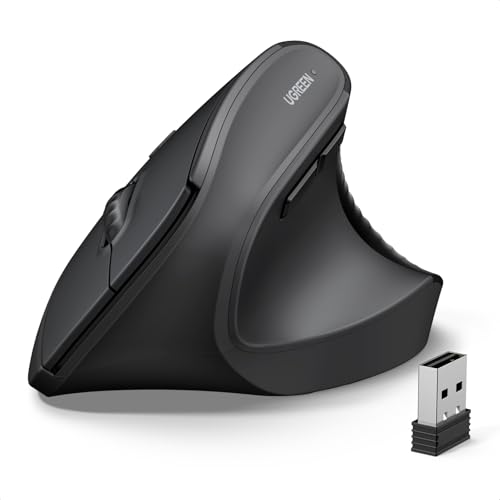
A personal computer accessory designed to reduce wrist strain while delivering precise optical tracking and multi-mode connectivity. Comfortable control keeps long hours at the desk productive and less tiring. Is the UGREEN Ergonomic Wireless Mouse the right upgrade for right-handed users who spend long sessions at the computer?
⚡ At a Glance
- • Ergonomic Comfort: 57° vertical grip encourages a neutral forearm posture and reduces wrist strain, intended for right hands 17 cm or longer
- • Best for: Office professionals, remote workers and CAD users who need sustained comfort and precise pointer control
- • Not ideal for: Left-handed users or people with smaller hands under 17 cm who require an ambidextrous shape
Vertical 57° grip promotes a natural forearm posture, paired with Bluetooth 5.4 and 2.4GHz connectivity. Optical tracking with four adjustable DPI levels supports detailed pointer work.
Reduced wrist strain – Thanks to the 57° vertical grip
A 57° vertical grip positions the hand to reduce forearm pronation, shifting the palm orientation compared with a flat mouse. Manufacturer notes an adjustment period of two to four weeks for many users to acclimatise.
Less wrist discomfort during extended sessions, with improved posture for office and creative work once familiar with the new grip.
Seamless multi-device workflow – With Bluetooth 5.4 and 2.4GHz dual modes
Bluetooth 5.4 and a 2.4GHz USB receiver provide two connection paths and easy switching between them. Descriptions mention support for connecting to multiple devices and switching modes for desktop, laptop or tablet use.
Quickly switch between a desktop via USB receiver and a tablet or laptop via Bluetooth, avoiding repeated pairings for common work setups.
Accurate pointer control for detailed tasks – Thanks to 4 adjustable DPI settings up to 4000
Optical tracking supports four DPI levels: 4000, 2000, 1600 and 1000, with tracking reported to work on many surfaces, including glass. High-DPI option helps when fine cursor control is required.
Pinpoint control for CAD drafting, photo editing and precise navigation, while lower DPI levels suit general browsing and office tasks.
✨ The 4 Key Reasons for UGREEN Ergonomic Wireless Mouse
- Silent clicks – Keeps shared workspaces quiet during long periods of focused work
- Six buttons including next/previous – Navigate web pages and documents without reaching for the keyboard
- 12-month battery life – Delivers extended use between battery replacements, batteries not included
- Cross-platform compatibility – Works across Windows, macOS, Chrome OS, Linux and Android devices
📋 Technical Details at a Glance
- Category: Personal computer accessory
- Connection: Bluetooth 5.4 and 2.4GHz USB receiver
- DPI: 1000 / 1600 / 2000 / 4000
- Buttons: Six buttons, includes next/previous for browsing
- Ergonomic angle: 57° vertical grip
❓ Frequently Asked Questions
Q: Is the mouse suitable for left-handed users?
A: No, the design is for right-handed users and is not suitable for left-handed people, according to the manufacturer.
Q: Does the mouse include batteries and how long do they last?
A: Batteries are not included, and the specification lists a 12-month battery life based on typical use.
Q: How many devices can be connected at once?
A: Connection is available via Bluetooth and a 2.4GHz USB receiver, with manufacturer notes about switching modes and connecting multiple devices; descriptions reference both up to two devices at the same time and up to three devices via Bluetooth and 2.4GHz.
🏆 Our Verdict
The UGREEN Ergonomic Wireless Mouse suits right-handed office workers, remote professionals and creatives who need ergonomic support and precise control. Vertical 57° grip, adjustable DPI, quiet clicks and dual-mode connectivity combine into a practical kit for long desk sessions. With long battery life and broad compatibility, the design delivers solid long-term value for users prioritising comfort and multi-device workflows.
