





'%3e%3cpath%20fill-rule='evenodd'%20clip-rule='evenodd'%20d='M33%2033H1V1H33V33Z'%20fill='white'/%3e%3cpath%20fill-rule='evenodd'%20clip-rule='evenodd'%20d='M33%2033H1V17H33V33Z'%20fill='%23DC143C'/%3e%3c/g%3e%3crect%20x='0.5'%20y='0.5'%20width='33'%20height='33'%20rx='16.5'%20stroke='black'%20stroke-opacity='0.1'/%3e%3cdefs%3e%3cclipPath%20id='clip0_37449_250459'%3e%3crect%20x='1'%20y='1'%20width='32'%20height='32'%20rx='16'%20fill='white'/%3e%3c/clipPath%3e%3c/defs%3e%3c/svg%3e)

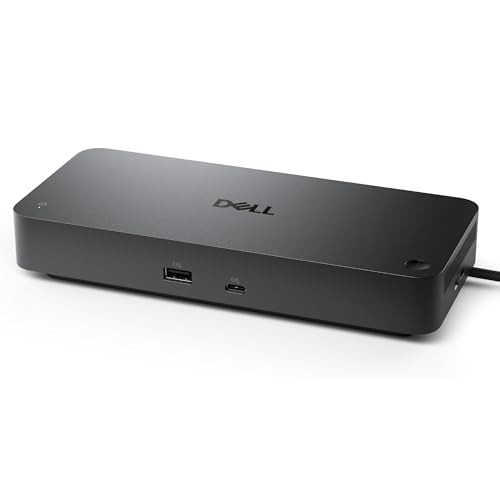

Few things are as frustrating as plugging a laptop into multiple leads only to find it neither charging fully nor driving your external monitors. The Dell Pro Thunderbolt 5 Smart Dock centralises up to 300W power and four-display connectivity over a single reversible USB-C cable, clearing desktop clutter and keeping a busy workstation responsive.
⚡ At a Glance
- • Connectivity: Thunderbolt 5, HDMI 2.1, DisplayPort 2.1, 4x USB-A 3.2 Gen 2, 2x USB-C 3.2 Gen 2 and 2.5GbE
- • Perfect for: Hybrid professionals and IT-managed offices needing single-cable power and multiple high-refresh displays
- • Less effective for: Non‑Dell mobile workstation users with sustained peak draws above 240W; the 240W supply to other systems will not keep heavy workloads fully charged, causing battery discharge under prolonged GPU/CPU load
Single-cable docking delivers up to 300W to Dell laptops and supports four external displays at high refresh rates. Enterprise management features and recycled materials make it suitable for managed, eco-aware workspaces.
Consistent Power Delivery: The 300W USB-C Role
Provides up to 300W Power Delivery for Dell systems and 240W for non‑Dell systems through a single USB-C cable, so laptops receive stable charging while peripherals remain connected. Direct single-cable power removes the need for separate power bricks and simplifies hot‑desk setups.
Single-cable charging keeps a workstation powered and tidy while running heavy apps and multiple USB devices. For desk-based users who switch laptops frequently, the combined power and port count speeds transitions between workstations.
How Multi-Display Support Changes Multitasking
Supports up to four external displays with capability for 4K at 120Hz and 8K at 60Hz, which preserves clarity and smooth motion across reference windows, timelines and full‑screen previews. In a multi-app editing session, high refresh and resolution maintain readable text and fluid scrubbing.
Expanded screen real estate keeps timelines, chats and source material visible without constant alt‑tabbing. For designers and analysts, sustained high refresh reduces motion judder and preserves visual fidelity during fast interactions.
Mastering Remote IT Management via Enterprise Features
Includes Intel AMT over Thunderbolt, MAC Address Pass-Through, PXE Boot, a WLAN-to-LAN switch and support for remote updates via Dell Command Update, enabling centralised maintenance and network boot workflows. These features integrate with corporate tooling to streamline large-scale rollouts and troubleshooting.
If an IT team needs to deploy firmware or recover endpoints remotely, the onboard management functions enable those tasks without physical access. Central management reduces onsite visits and speeds secure patching across a fleet.
✨ The Verdict on Dell Pro Thunderbolt 5 Smart Dock Performance
- 300W Power Delivery – Keeps high‑performance laptops charged while docked and active
- Multi‑display support – Drives up to four screens including 4K@120Hz and 8K@60Hz
- Enterprise management – Enables remote updates, PXE boot and AMT for IT teams
- Sustainable construction – 65% post‑consumer recycled plastic reduces environmental impact
📋 Technical Details at a Glance
- Power Delivery: Up to 300W (Dell systems) / 240W (other systems)
- Display Support: Up to 4 external displays; 4K @ 120Hz, 8K @ 60Hz
- Thunderbolt ports: 2x Thunderbolt 5
- DisplayPort: 2x DisplayPort 2.1
- HDMI: HDMI 2.1
🏆 Our Verdict
Suitable for hybrid professionals, creative teams and IT-managed offices that require high-power single-cable docking and multiple high-refresh displays. The reversible 83 cm cable lies long enough to route neatly behind monitors while the compact recycled-plastic enclosure keeps a desk uncluttered. Given the performance and enterprise features, the dock represents a practical, future-ready investment for organised workspaces.
