





'%3e%3cpath%20fill-rule='evenodd'%20clip-rule='evenodd'%20d='M33%2033H1V1H33V33Z'%20fill='white'/%3e%3cpath%20fill-rule='evenodd'%20clip-rule='evenodd'%20d='M33%2033H1V17H33V33Z'%20fill='%23DC143C'/%3e%3c/g%3e%3crect%20x='0.5'%20y='0.5'%20width='33'%20height='33'%20rx='16.5'%20stroke='black'%20stroke-opacity='0.1'/%3e%3cdefs%3e%3cclipPath%20id='clip0_37449_250459'%3e%3crect%20x='1'%20y='1'%20width='32'%20height='32'%20rx='16'%20fill='white'/%3e%3c/clipPath%3e%3c/defs%3e%3c/svg%3e)

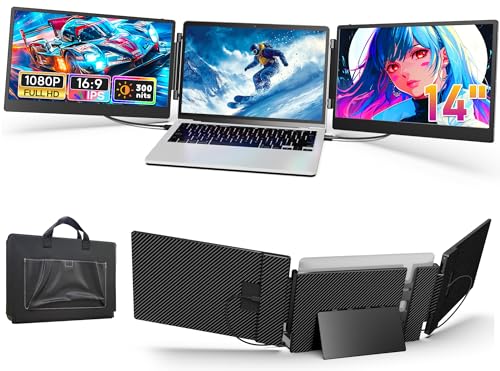

In a typical UK kitchen, space is often repurposed as a home desk and makeshift workstations demand compact solutions. JEEJIA Laptop Screen Extender adds two 14-inch Full HD portable displays to compatible laptops, turning a single machine into a three-monitor setup with plug-and-play connections.
⚡ At a Glance
- • Image Quality: 14-inch Full HD panels (1920×1080), 300 nits brightness, 1:1000 contrast, 80% colour gamut, 60Hz refresh
- • Best suited to: Remote workers and multitaskers who need two extra portable panels for spreadsheets, browser tabs and video calls
- • Not for: Owners of MacBook Air models with M1/M2/M3 chips expecting a triple-monitor setup; those Macs are incompatible and will leave one or both external displays failing to initialise, producing a persistent black screen
Two 14-inch Full HD portable extenders expand a compatible laptop into a three-monitor workstation. Each panel offers adjustable brightness and volume and requires full-function USB-C or a mixed USB-C/HDMI connection.
📋 Technical Details at a Glance
- Screen size: 14-inch
- Resolution: 1920 × 1080 (Full HD)
- Brightness: 300 nits
- Contrast ratio: 1:1000
- Colour gamut: 80%
The Productivity Boost of Triple Display Explained
Each extender supplies a 14-inch 1920×1080 panel and connects via plug-and-play USB-C or a USB-C plus HDMI combination, so two extenders expand the laptop desktop across three separate viewing surfaces and keep multiple apps visible at once.
Extra desktop space removes constant window juggling and speeds up workflows for spreadsheets, research and calls. With independent brightness and audio controls on each panel, prolonged sessions stay comfortable and focused.
The 14-inch Panel Advantage in Detail
Panels deliver 300 nits brightness, a 1:1000 contrast ratio and an 80% colour gamut at 60Hz, which produces clear text, reliable colours for decks and smooth pointer motion during presentations.
Readable text and lively colours make editing documents and reviewing slides straightforward, while the moderate refresh rate keeps motion smooth without draining laptop resources.
Portable Design for the Modern User
Each panel folds 180 degrees and comes with a padded carry bag, and the widened adjustable angle bracket improves stability when the extenders sit beside a laptop on a small desk or table.
Lightweight and foldable, the S3 variant weighs 2.15 kg (roughly the weight of a 15-inch laptop) and packs flat for commuting or travel. If you have two full-function USB-C ports, you will unlock the complete triple-display experience immediately with plug-and-play setup.
✨ The Tested Highlights of JEEJIA Laptop Screen Extender
- Plug-and-play connectivity – No drivers required, so extra monitors connect quickly via USB-C or mixed USB-C/HDMI
- Individual display controls – Each panel has separate brightness and volume adjustments for tailored comfort
- Fold-flat portability – 180° folding panels and a carry bag make the pair easy to transport
- Widened adjustable bracket – Enhanced stability keeps the panels aligned alongside a laptop during use
❓ Frequently Asked Questions
Q: Will it work with MacBook Air models that use M-series chips?
A: The extender is not compatible with MacBook Air models powered by M1, M2 or M3 chips; those systems cannot drive the triple-display arrangement. Contact the 24/7 technical support team for potential workarounds or compatibility advice.
Q: What cables and ports are required to run two extenders?
A: Two fully functional USB-C ports are the simplest option, wired with USB-C to USB-C cables; alternatively one full-function USB-C plus an HDMI connection and a USB-A to Type-C adapter will connect the second panel. Confirm that at least one USB-C port supports video and power, as some ports are data- or power-only and will not transmit video.
Q: What should I do if a panel shows 'no signal'?
A: A 'no signal' condition most commonly indicates a non-full-function USB-C port, a power-saving mode or a cable mismatch; try swapping ports and cables and disable power-saving on the laptop. If the issue continues, reach out to the vendor's 24/7 technical support for step-by-step troubleshooting.
🏆 Our Verdict
Suitable for remote workers and commuters who want two extra portable panels for real multitasking. The widened angle bracket and fold-flat design create a stable, near-continuous desktop that sits neatly beside a laptop on a small table. The supplied carry bag and build quality deliver strong long-term value for anyone who will use triple displays regularly.
