





'%3e%3cpath%20fill-rule='evenodd'%20clip-rule='evenodd'%20d='M33%2033H1V1H33V33Z'%20fill='white'/%3e%3cpath%20fill-rule='evenodd'%20clip-rule='evenodd'%20d='M33%2033H1V17H33V33Z'%20fill='%23DC143C'/%3e%3c/g%3e%3crect%20x='0.5'%20y='0.5'%20width='33'%20height='33'%20rx='16.5'%20stroke='black'%20stroke-opacity='0.1'/%3e%3cdefs%3e%3cclipPath%20id='clip0_37449_250459'%3e%3crect%20x='1'%20y='1'%20width='32'%20height='32'%20rx='16'%20fill='white'/%3e%3c/clipPath%3e%3c/defs%3e%3c/svg%3e)

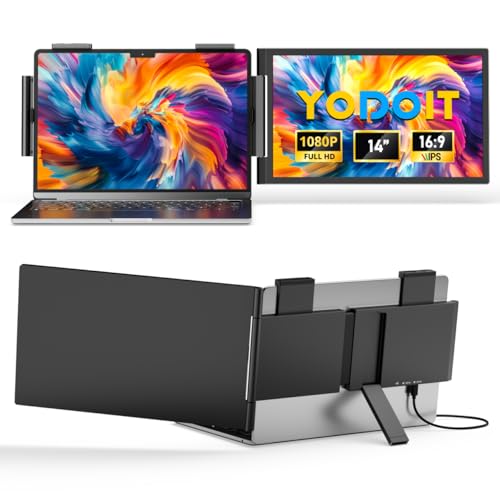
A personal computer accessory that extends laptop displays to make multitasking simpler. Perfect for travellers and remote workers who need extra screen space, Yodoit Laptop Screen Extender helps keep documents and video calls visible at the same time. Will your laptop or phone support video output from the available USB-C or HDMI ports?
⚡ At a Glance
- • Image Quality: 1920×1080 FHD IPS panel with 178° viewing angles and vivid colour reproduction
- • Best for: Remote workers, business travellers and gamers needing a portable secondary display
- • Not ideal for: Devices without USB-C ports that support DisplayPort Alternate (DP Alt) or HDMI Alternate
14-inch 1920×1080 FHD IPS travel monitor with HDR and built-in speakers, weighing about 1.1kg and 2cm thin. USB Type-C and mini HDMI connections enable plug-and-play extension or mirroring, with a special video C2C cable provided for supported USB-C setups.
Work Across Two Screens – Thanks to USB-C and mini HDMI plug-and-play
USB Type-C ports that support DisplayPort Alternate (DP Alt) or HDMI Alternate can transmit video, while a mini HDMI option offers a wired alternative. A special video C2C cable is included for USB-C to USB-C video connections where required.
Users can extend or mirror displays without driver installation, so spreadsheets and video calls sit side-by-side for clearer workflows and fewer window toggles.
Clear, Comfortable Viewing – With 14-inch FHD IPS and HDR
The 14-inch 1920×1080 IPS panel delivers wide 178° viewing angles and HDR for improved contrast, while low blue light technology reduces high-energy visible wavelengths.
Sharp text and accurate colours suit document work and media consumption, and eye-care features help reduce fatigue during long sessions.
Designed for Travel – Thanks to 1.1kg weight and 2cm thin profile
A lightweight 1.1kg chassis and a slim 2cm thickness make the monitor compact enough for a laptop bag, and built-in speakers eliminate the need for extra audio peripherals on the move.
Slim dimensions and modest weight make carrying a secondary screen practical for commuting, client meetings and short trips, while basic audio is covered by integrated speakers.
✨ The 4 Key Reasons for Yodoit Laptop Screen Extender
- Plug-and-play connections – Extend a laptop display instantly, no driver installation required
- Full HD IPS panel – Crisp text and accurate colour for documents and media
- HDR and low blue light – Better contrast and reduced eye fatigue during long use
- Portable dimensions – Light and slim enough for frequent travel and commuting
📋 Technical Details at a Glance
- Display: 14-inch FHD IPS, 1920×1080, 178° viewing angle, HDR
- Processor: N/A
- RAM: N/A
- Storage: N/A
- Camera(s): N/A
❓ Frequently Asked Questions
Q: Will the monitor work with any USB-C laptop?
A: Only USB-C ports that support DisplayPort Alternate (DP Alt) or HDMI Alternate can transmit video; check the laptop’s port specifications before connecting.
Q: Can I use the monitor with a smartphone?
A: Phones need a full-featured Type-C port that supports video output, so only compatible smartphones will display video.
Q: Do I need to install drivers to use the monitor?
A: No driver installation is required; the monitor uses plug-and-play connections via the included USB Type-C or mini HDMI cable.
🏆 Our Verdict
Remote workers, business travellers and casual gamers will benefit from adding a lightweight 14-inch secondary screen for multitasking. Full HD IPS with HDR, low blue light and plug-and-play USB-C/mini HDMI connectivity combine to simplify workflows and media playback. Given the travel-friendly weight and broad compatibility, the overall package represents strong long-term value for anyone who relies on a second screen away from a desk.
