





'%3e%3cpath%20fill-rule='evenodd'%20clip-rule='evenodd'%20d='M33%2033H1V1H33V33Z'%20fill='white'/%3e%3cpath%20fill-rule='evenodd'%20clip-rule='evenodd'%20d='M33%2033H1V17H33V33Z'%20fill='%23DC143C'/%3e%3c/g%3e%3crect%20x='0.5'%20y='0.5'%20width='33'%20height='33'%20rx='16.5'%20stroke='black'%20stroke-opacity='0.1'/%3e%3cdefs%3e%3cclipPath%20id='clip0_37449_250459'%3e%3crect%20x='1'%20y='1'%20width='32'%20height='32'%20rx='16'%20fill='white'/%3e%3c/clipPath%3e%3c/defs%3e%3c/svg%3e)

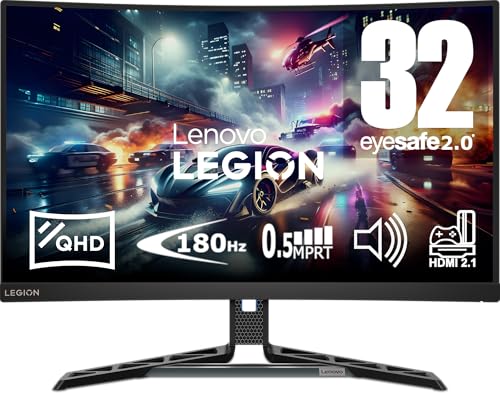

Taking a closer look at the 31.5-inch corner of the market, the Lenovo Legion R32qc-30 Gaming Monitor puts QHD resolution and a high-refresh VA panel in a single package. Large-screen clarity and quick refresh rates reward both immersive play and desktop productivity. Is the 180Hz ceiling the right compromise for serious gamers and creators?
⚡ At a Glance
- • Image Quality: QHD (1440p) VA panel with 99% sRGB, 90% DCI-P3 and VESA DisplayHDR 400
- • Tailored for: PC and console gamers who want larger QHD screens with adaptive sync and ergonomic adjustability
- • Incompatible with: Tournament-level esports rigs that run at 360Hz; the 180Hz maximum prevents full exploitation of ultra-high frame rates and therefore cannot deliver the tiny input-window gains sought by top-tier competitors
31.5-inch QHD VA panel with up to 180Hz refresh, 0.5ms MPRT and AMD FreeSync Premium. Ergonomic Lift, Tilt, Pivot and Swivel stand plus 2x HDMI and 1x DisplayPort for multi-platform setups.
📋 Technical Details at a Glance
- Screen size: 31.5 inches (roughly the width of a full oven tray)
- Panel type: VA
- Resolution: QHD (2560 x 1440)
- Refresh rate: 60–180Hz
- Response time: 0.5 ms MPRT
How QHD VA Clarity Changes Target Acquisition
QHD resolution on a 31.5-inch VA panel increases pixel density compared with 27-inch 1440p displays, producing clearer edges and more readable HUD elements. 99% sRGB and 90% DCI-P3 colour coverage with VESA DisplayHDR 400 delivers stronger contrast and more saturated mid-tones for visually rich scenes.
Sharper on-screen detail improves enemy recognition and makes split-screen work less cramped, which benefits both gaming and productivity. Bear in mind that VA panels trade some off-axis accuracy for higher contrast, so colour shifts appear if you view the screen from an acute angle.
The Smoother Motion: Why 180Hz Matters
A refresh range from 60 to 180Hz combined with a 0.5ms MPRT removes much of the motion blur that blurs fast pans and quick turns. AMD FreeSync Premium synchronises frame output with the GPU to eliminate tearing and reduce stutter during rapid frame-rate changes.
You will notice crisper motion and more consistent aim tracking in fast-paced titles, which translates to tangible in-game advantages. If you already run a 240Hz or 360Hz competitive setup, the 180Hz limit prevents taking full advantage of ultra-high frame rates, so choose according to your play style.
Why Ergonomics and Connectivity Is a Standout Attribute
A fully ergonomic stand provides Lift, Tilt, Pivot and Swivel adjustments, allowing quick repositioning for different seating heights and multi-user desks. Two HDMI ports and one DisplayPort make switching between PC and consoles straightforward without constant cable swapping.
Comfortable positioning reduces neck and shoulder strain during long sessions and the I/O layout supports a mixed-console desk. Note the screen carries an energy efficiency class of G, so expect higher standby and active draw than the most efficient displays.
✨ The Verdict on Lenovo Legion R32qc-30 Gaming Monitor Performance
- 31.5-inch QHD VA panel – Delivers spacious desktop space with crisper visuals for games and productivity
- 180Hz refresh rate – Reduces motion blur and improves aim tracking in fast titles
- 0.5ms MPRT response time – Cuts ghosting on quick camera pans and rapid motion
- Fully ergonomic stand and multi-port I/O – Enables comfortable long sessions and easy console/PC switching
🏆 Our Verdict
The Lenovo Legion R32qc-30 Gaming Monitor suits gamers and content consumers who want a large QHD display with high refresh and strong contrast. The ergonomic stand moves with reassuring smoothness and the screen’s punchy mids and deep blacks make scenes feel immersive and lively. For buyers planning regular long sessions or mixed-console use, the build and feature set justify the outlay despite the less efficient energy class.
